
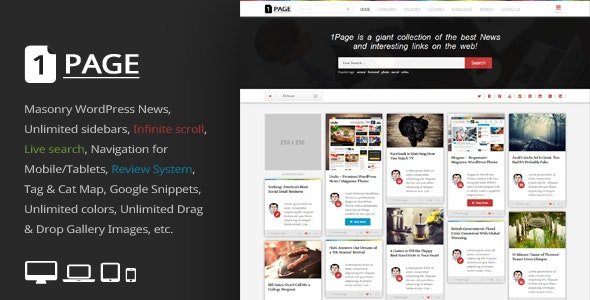
1Page – Masonry WordPress News & interesting links v4.4
⚡ Instant Direct Download link delivered immediately to your account
Bank-Grade Encrypted Gateway • Instant Digital Download • Zero Risk Guarantee
100% Working Genuine GPL Untouched Files & Safe Direct Downloads
Product Overview
Content-heavy websites often fail because important stories compete for space in a rigid layout. This masonry-focused WordPress theme takes a different approach by arranging posts in a responsive grid that can accommodate varied image and text heights. The result is especially useful for news collections, curated links, personal magazines, visual blogs, review sites, and publications that want readers to discover several topics from one page without following a traditional newspaper layout.
Turn A Mixed Content Feed Into A Browsable Publication
The central design uses a multi-column masonry presentation to place content cards according to the available space. This helps make efficient use of the screen when posts contain different featured-image ratios or excerpt lengths. Publishers can build a visually active homepage while retaining a recognizable reading hierarchy through categories, tags, titles, and featured media.
Two homepage examples and support for a five-column masonry style give administrators a starting point for different editorial densities. A broad desktop grid can reveal more stories at once, while the responsive layout adjusts the presentation for tablets and phones. The design is therefore suitable for visitors who scan headlines quickly as well as readers who explore through images.
Make Discovery Part Of The Reading Experience
A large archive needs more than an attractive first screen. Live search can help visitors see relevant results while they type, reducing the steps required to locate a topic. Tag and category maps provide another route through the archive by presenting taxonomies in a structured format. These tools can be particularly valuable for publications with recurring subjects, resources, product collections, or long-running editorial series.
Publishers can choose between standard pagination and infinite scrolling. Pagination creates clear archive boundaries and may be easier for visitors who want to return to a known page. Infinite scroll supports uninterrupted exploration and can work well for discovery-driven content. The correct choice depends on the audience, analytics, advertising setup, and accessibility goals, so both experiences should be tested with real content.
Build Sidebars Around Different Editorial Sections
Unlimited sidebar support allows separate pages and articles to use different widget combinations. A review section might show popular posts and category links, while a video area could prioritize media widgets and recent discussions. A focused landing page can avoid a busy sidebar entirely. This flexibility helps editors avoid showing the same secondary information on every part of the site.
The included custom widgets cover commonly requested discovery functions such as frequently used tags, posts from selected categories, popular content based on views or likes, video embeds, and accordion content. Default WordPress widgets remain available as well. Administrators should use widgets selectively: a smaller set of relevant links generally creates a clearer experience than filling every available area.
Publish Stories, Galleries, Videos, And Curated Links
The theme is not limited to conventional text posts. Gallery-oriented publishing benefits from drag-and-drop image ordering and support for multiple images in a slider format. YouTube and Vimeo content can be associated with posts, making the layout useful for entertainment, technology, culture, photography, or media-curation projects.
Curated-link publishers can use externally focused posts to introduce a resource and then guide readers to the original destination. This can support link roundups, affiliate-led editorial content, product discovery, learning resources, or industry news. Every external link should be clearly described, reviewed for relevance, and disclosed when it carries an affiliate relationship. Original commentary adds more value than publishing a grid of unexplained outbound links.
Add Reviews Without Losing Editorial Control
A rating and review workflow can help structure product opinions, entertainment reviews, comparisons, or service evaluations. Editors may create criteria that reflect the subject instead of applying one generic score to everything. A technology review might consider usability and performance, while a film review might focus on story, direction, and presentation.
Ratings should support the article rather than replace it. Explain how the score was reached, keep criteria consistent within a category, and avoid structured data that does not match visible content. Review pages are strongest when readers can understand the reasoning behind the rating and compare it with related coverage.
Control Branding And Article Presentation
Unlimited color settings, custom logo and favicon options, Font Awesome icons, and a sticky-header option help shape the publication’s identity. Custom CSS can be added through theme options when a project requires a targeted refinement. A child theme is included as a safer base for code-level changes, allowing customizations to remain separate from the main theme files.
Individual posts can hide the featured image when the story already begins with embedded media or a custom gallery. Category descriptions provide space for helpful introductions to archive pages, and social-sharing controls can make it easier for readers to distribute articles. Translation files support localization work for publishers serving more than one language.
Prepare The Site For Search And Performance
The theme provides features such as category descriptions and snippet-related markup, but ranking still depends on the quality of the publication. Write original headlines and summaries, maintain logical categories, use descriptive internal links, and avoid creating hundreds of near-empty tag archives. Compress featured images, limit unnecessary plugins, configure caching carefully, and measure performance with the actual advertising and analytics tools used by the site.
Infinite-scroll pages should preserve accessible navigation and crawlable archive paths. Editors should also review heading order, image alternative text, link labels, and keyboard navigation. Search features and visual grids improve discovery only when readers can understand and operate them across different devices.
Set Up The Theme With A Controlled Workflow
- Back up the current site or prepare a separate staging installation.
- Upload and activate the theme, then install only the required plugins.
- Review documentation before importing the included sample XML content.
- Configure the logo, colors, typography, menus, archive behavior, and sidebars.
- Create a small set of real posts before deciding on column density and pagination.
- Test search, galleries, videos, ratings, sharing, and mobile navigation.
- Confirm forms, tracking, caching, and structured data before launch.
Download This GPL Magazine Theme From GPLCARE
GPLCARE provides this downloadable WordPress product for users building and maintaining their own editorial websites. The GPL download gives you theme files to evaluate and customize within an appropriate WordPress environment. Hosting, installation, content production, security, plugin subscriptions, compatibility testing, and ongoing maintenance remain the responsibility of the website owner.
Visit the GPL WordPress Themes collection to compare this masonry approach with other layouts for magazines, blogs, portfolios, and business websites. Before using the theme on a live publication, review the included documentation, keep a recoverable backup, and test the complete editorial workflow on staging with your own posts and media.
Technical Specifications & Compatibility
| License | GPL |
| Current Version | v10.9.4 |
| Original Author | GPLCare |
| WordPress Compatibility | WP 5.8 to 6.7+ (Fully Compatible) |
| PHP Requirements | PHP 7.4 / 8.0 / 8.1 / 8.2 / 8.3 |
| File Integrity | 100% Untouched (Original .zip) |
| Security & Safety | 100% Clean & Verified (Safe) |
| Download Delivery | Instant Direct High-Speed Download |
Instant Direct Download
High-speed direct download link
100% Virus-Free
Verified authentic & clean files
VIP Priority Support
Direct 24/7 Helpdesk & Ticket
Related Products You May Like
View Catalog → 🔥 HOT DEAL
Gillion Theme v4.12 -Multi-Concept Blog/Magazine & Shop WordPress AMP
 🔥 HOT DEAL
 🔥 HOT DEAL
MagPlus Theme GPL v6.4 - Blog, Magazine Elementor WordPress Theme
 🔥 HOT DEAL
Foxiz Theme v2.7.5 (Activated)- WordPress Newspaper News and Magazine
Customer Reviews
No reviews yet for this product
Have you purchased or downloaded this item? Be the first to share your honest feedback with the community!
Want Unlimited Access to This & 7,400+ Other Items?
Stop buying items one by one. Join thousands of creators getting 1-click instant direct downloads, daily regular updates, and priority support for our entire theme and plugin collection.