
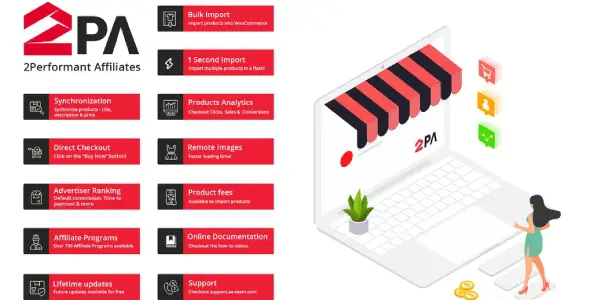
2PA - WooCommerce 2Performant Affiliates WordPress
⚡ Instant Direct Download link delivered immediately to your account
Bank-Grade Encrypted Gateway • Instant Digital Download • Zero Risk Guarantee
100% Working Genuine GPL Untouched Files & Safe Direct Downloads
Product Overview
2PA WooCommerce 2Performant Affiliates WordPress Plugin
2PA WooCommerce 2Performant Affiliates is a specialist affiliate-store tool created for WordPress websites that use WooCommerce and the 2Performant network. Instead of entering every external product by hand, the plugin provides a structured way to discover and bulk import products from participating affiliate programs into a WooCommerce catalog. The imported listings can then be organised with familiar WooCommerce categories, product pages and store navigation while the merchant continues to earn through the relevant affiliate relationship.
This workflow is useful for publishers, comparison websites, niche catalog owners and affiliate marketers who want a store-style presentation without holding stock or processing each advertised product as a conventional merchant. Availability of advertisers, products and commission opportunities depends on the user’s approved 2Performant account and the programs available in that account.
What Makes 2PA Different
2PA is not designed to create an affiliate program for a store’s own customers. Its purpose is to connect an existing WooCommerce website with product information available through 2Performant. This distinction matters because the plugin focuses on catalog acquisition, product synchronisation, remote images, advertiser research and performance information rather than affiliate registration or commission payout management.
The developer’s documentation separates the workflow into practical areas such as plugin setup, bulk product importing, remote images, product synchronisation, advertiser ranking and analytics. Together, these tools help turn a normal WordPress installation into a more manageable affiliate catalog.
Bulk Import Products From Affiliate Programs
Building a useful affiliate store manually can require repeated copying of names, images, descriptions, prices and destination URLs. 2PA reduces that repetitive work through its bulk import interface. The developer describes access to products from more than 730 affiliate programs available through 2Performant, although the actual selection visible to an individual user may vary by region, account approval and current network inventory.
Store owners can research suitable offers, select products that match their niche and bring multiple listings into WooCommerce in a planned batch. A focused import strategy is generally better than adding every available item. Selecting relevant products helps visitors understand the catalog, improves category quality and makes future maintenance easier.
Use Familiar WooCommerce Catalog Tools
Once products are imported, website administrators can work with the familiar WooCommerce environment. Products can be placed in logical categories, included in menus, displayed in product grids and discovered through the store’s normal search and archive pages. This makes the affiliate catalog feel like part of the existing website instead of a disconnected list of promotional links.
WooCommerce also gives site owners control over presentation through compatible themes and extensions. The final appearance still depends on the active theme, template customisations and the quality of the data supplied by each advertiser, so a staging-site review is recommended before a large catalog is published.
Remote Image Workflow
Large product imports can consume substantial storage when every image is copied into the WordPress media library. The 2PA documentation includes a remote-images feature intended to support a lighter catalog workflow. Using externally served product images can reduce local media duplication and may make an initial import more practical for a site with limited disk space.
Remote assets also introduce responsibilities. Image availability, dimensions and response speed may be controlled by an external source. Administrators should inspect important product pages, use an appropriate caching setup and confirm that their chosen method complies with the advertiser’s feed terms. A remote-image option is a catalog-management tool, not a guarantee that every external asset will remain permanently available.
Product Synchronisation
Affiliate catalogs change over time. A product may receive a new price, updated availability, revised description or a different destination. Product synchronisation helps reduce the gap between imported WooCommerce data and the information supplied through the connected source. This is especially valuable when a site contains more products than an administrator could reasonably check one by one.
Before scheduling or running a broad synchronisation, take a current backup and test a small group of products. Review how local edits are treated, which data fields are refreshed and whether unavailable products need a separate cleanup rule. A controlled process protects carefully written category text or product-page customisations from accidental replacement.
Advertiser Ranking And Analytics
More products do not automatically create a stronger affiliate website. Merchants also need to understand which advertisers and offers are worth their visitors’ attention. The advertiser-ranking and analytics areas documented for 2PA can support that decision-making process. They provide a more informed foundation for choosing programs instead of importing products only because they are available.
Analytics should be interpreted alongside the website’s own traffic and conversion information. A high-performing advertiser in the wider network may not be the best match for every audience. Niche relevance, landing-page quality, commission conditions, geographic coverage and visitor intent should all be considered when deciding what to feature.
Suitable Use Cases
- Creating a focused affiliate catalog around a specific product niche.
- Adding store-style navigation to a content-led affiliate website.
- Researching multiple 2Performant advertisers from one WordPress dashboard.
- Importing selected product groups without creating each WooCommerce entry manually.
- Maintaining a changing catalog with synchronisation tools.
- Using WooCommerce categories and theme layouts to organise external offers.
Recommended Setup Process
- Install and activate WooCommerce on a staging or development copy of the website.
- Install the 2PA plugin and open its setup area in the WordPress dashboard.
- Connect the required 2Performant account details according to the developer documentation.
- Review advertisers and select programs that fit the website’s audience.
- Import a small test batch before processing a large catalog.
- Inspect titles, images, prices, affiliate destinations and category placement.
- Configure synchronisation and remote-image behaviour only after the test is successful.
- Monitor links, product relevance and analytics after publication.
The plugin requires a functioning WooCommerce installation and access to the appropriate 2Performant services. Network-side approvals, API availability and advertiser data are external dependencies and are not supplied by the WordPress plugin package itself.
Catalog Quality And SEO Considerations
Affiliate feed data is convenient, but imported text may also appear on other websites using the same source. For stronger search visibility, avoid relying only on the raw feed. Build useful category introductions, add original comparisons where appropriate and keep the catalog limited to offers that genuinely support the topic of the website. Do not make claims about stock, warranty or delivery unless those details are confirmed on the advertiser’s destination page.
Clear disclosure is equally important. Visitors should understand that a link may lead to an external merchant and that the website may receive a commission. Use the disclosure format required in the markets where the site operates and follow the current terms of both 2Performant and each selected advertiser.
Download And Installation Notes
The downloadable package available from GPLCARE is intended for users who understand how to install WordPress plugins manually. Create a complete backup before installation, confirm the server meets the current requirements of WordPress and WooCommerce, and test the plugin with the active theme and essential extensions. If the site already contains a large product database, a staging test is particularly important.
A GPL-distributed package provides the plugin files under the applicable licence. It does not automatically include the original developer’s account services, premium support, network approval, hosted API access or automatic updates. Those services may require a separate relationship with their respective providers.
Explore Related WooCommerce Tools
For additional catalog workflows, see the Product Import Export Plugin For WooCommerce. You can also browse more WordPress WooCommerce Plugins and the complete WordPress Plugins Collection available on GPLCARE.
Frequently Asked Questions
What Does The 2PA Plugin Do?
It helps WooCommerce users research and bulk import affiliate products available through 2Performant, then manage those listings within a WordPress store catalog.
Does It Create An Affiliate Program For My Own Store?
No. Its documented focus is importing and managing products from the 2Performant affiliate network. It is different from a referral plugin that registers affiliates and calculates commissions for a merchant’s own sales.
Do I Need WooCommerce?
Yes. The plugin is built around WooCommerce product and catalog functionality, so WooCommerce should be installed and correctly configured.
Is A 2Performant Account Required?
A suitable account and access to approved advertiser programs are required to use the connected network features. The WordPress plugin does not create network approval by itself.
Can Imported Products Be Synchronised?
Product synchronisation is included in the developer’s documented workflow. Test the behaviour on a small selection and back up the database before applying broad updates.
Are Developer Support And Automatic Updates Included?
No. A GPL download supplies the plugin files. Original support, hosted services, account approval and automatic updates are separate unless explicitly provided by the relevant service owner.
Technical Specifications & Compatibility
| License | GPL |
| Current Version | v10.9.4 |
| Original Author | GPLCare |
| WordPress Compatibility | WP 5.8 to 6.7+ (Fully Compatible) |
| PHP Requirements | PHP 7.4 / 8.0 / 8.1 / 8.2 / 8.3 |
| File Integrity | 100% Untouched (Original .zip) |
| Security & Safety | 100% Clean & Verified (Safe) |
| Download Delivery | Instant Direct High-Speed Download |
Instant Direct Download
High-speed direct download link
100% Virus-Free
Verified authentic & clean files
VIP Priority Support
Direct 24/7 Helpdesk & Ticket
Related Products You May Like
View Catalog → 🔥 HOT DEAL
 🔥 HOT DEAL
 🔥 HOT DEAL
WooCommerce - KissMetrics WooCommerce Extension 1.16.0
 🔥 HOT DEAL
Customer Reviews
No reviews yet for this product
Have you purchased or downloaded this item? Be the first to share your honest feedback with the community!
Want Unlimited Access to This & 7,400+ Other Items?
Stop buying items one by one. Join thousands of creators getting 1-click instant direct downloads, daily regular updates, and priority support for our entire theme and plugin collection.