
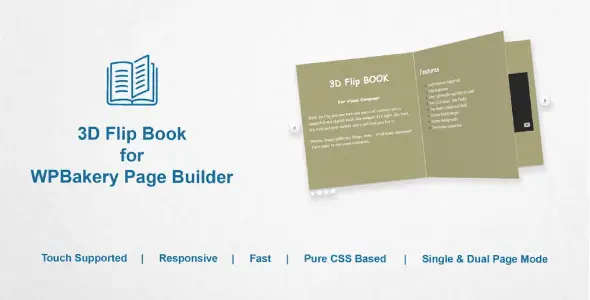
3D Flipbook for WPBakery Page Builder
⚡ Instant Direct Download link delivered immediately to your account
Bank-Grade Encrypted Gateway • Instant Digital Download • Zero Risk Guarantee
100% Working Genuine GPL Untouched Files & Safe Direct Downloads
Product Overview
3D Flipbook For WPBakery Page Builder
3D Flipbook For WPBakery Page Builder helps WordPress users turn ordinary PDFs, image collections, and HTML content into interactive publications with a realistic page-turning experience. Instead of asking visitors to read a flat document in a separate browser tab, you can present a magazine, catalogue, brochure, portfolio, menu, manual, or report directly inside a page designed with WPBakery Page Builder. The result is more visual, easier to explore, and better suited to websites where presentation matters.
This product is an add-on for a compatible WPBakery Page Builder installation. It is not a replacement for WPBakery itself. Once the required page builder is active, the flipbook element can be added to a layout and configured without rebuilding the surrounding page. That makes it useful for agencies, publishers, shops, educators, restaurants, creative professionals, and business owners who already use WPBakery and want an engaging document viewer.
Turn Static Documents Into Interactive Publications
A standard PDF link often interrupts the browsing experience. It may open a new tab, depend on the visitor's browser controls, or appear awkward on a small screen. A 3D flipbook provides a more focused way to move through the same material. Readers can turn pages, zoom into details, navigate to a specific section, and view the publication in a presentation that feels closer to a printed item.
The visual page movement is more than decoration. It gives readers a clear sense of progress and position, which is especially helpful when browsing a catalogue, digital magazine, photo book, annual report, or product brochure. Flexible page corners and realistic motion help the document feel responsive to user interaction while the surrounding WordPress page keeps your branding, call-to-action buttons, and related content close by.
Use PDFs, Images, Or HTML Content
The add-on supports several practical source types. A ready-made PDF can be used when your publication has already been designed in another application. Image-based pages are helpful for portfolios, illustrated books, menus, and promotional catalogues. HTML content gives advanced users another route when a page needs web-based elements or a structure that is not limited to a single uploaded document.
This flexibility means you do not need one workflow for every project. A design agency can display an exported client presentation, a retailer can publish seasonal product pages as images, and an organisation can embed a formatted report. Before publishing, optimise large PDFs and images for the web. Smaller files normally load faster and create a smoother experience, particularly for mobile visitors or readers using a slower connection.
Realistic Page Turning And Flexible Corners
The core attraction is the three-dimensional page-turning effect. Pages respond visually as the reader moves forward or backward, creating depth that a conventional slider cannot provide. Flexible corners support the printed-book impression and make navigation more intuitive because visitors can understand that the content continues beyond the current spread.
Presentation should always support the information rather than compete with it. For a formal manual, a restrained skin and simple navigation may be the best choice. For a creative portfolio or children's publication, a more expressive setup may fit the content. The available appearance controls let you match the flipbook to the purpose of the document while maintaining a consistent experience across the rest of the site.
Build The Viewer Inside WPBakery
Because the tool is designed for WPBakery Page Builder, the publication can become part of an existing page-building workflow. Add the relevant flipbook element, select or configure the content source, adjust the presentation, and place supporting sections around it. You can create an introduction above the viewer, put a download or enquiry call to action below it, and combine the publication with testimonials, pricing, contact information, or related products.
This approach is valuable when the document is only one part of the visitor journey. A product catalogue can sit beside purchase guidance. A restaurant menu can appear with opening hours and a booking button. A course booklet can be followed by an enrolment form. WPBakery controls the overall page layout, while the flipbook focuses on presenting the publication.
Responsive Reading On Desktop And Mobile
A useful document viewer must work beyond desktop screens. The flipbook is designed for responsive layouts and mobile-friendly viewing, allowing the presentation to adapt as the available space changes. Readers can interact with the publication on phones, tablets, laptops, and larger displays without requiring a separate mobile document.
Responsive design does not remove the need for testing. Check the viewer at several screen widths, confirm that controls remain easy to tap, and ensure important text inside the source document is large enough to read after scaling. A publication originally designed only for print may contain very small type, so mobile visitors may depend heavily on zoom. Testing the actual document is the best way to choose appropriate viewer dimensions and page settings.
Navigation, Zoom, Smart Pan, Links, And Bookmarks
Long publications need more than next and previous controls. Navigation options help readers move efficiently, while zoom makes detailed text, diagrams, prices, and photography easier to inspect. Smart panning supports movement around an enlarged page so visitors can focus on a specific area without losing control of the document.
When the source PDF contains supported links or bookmarks, those elements can improve movement through the publication. A linked table of contents can guide readers to a chapter, while a product link can connect a catalogue page with a relevant destination. Always test important links after uploading the final file because PDF export settings can affect how interactive elements are preserved.
Choose Inline Or Lightbox Presentation
Different pages require different viewing styles. An inline flipbook keeps the publication visible as part of the page and works well when the document is the main content. A lightbox-style presentation can keep the initial layout compact and open the publication in a larger focused view after the visitor clicks a cover, button, or other trigger.
Use the format that matches the reader's intent. A digital magazine landing page may benefit from a prominent inline viewer, while a services page with several brochures may be clearer with separate lightbox triggers. Whichever option you choose, provide a descriptive heading and a short introduction so visitors understand what they are about to open.
Customize Skins And Viewer Appearance
Skins and display settings help the viewer fit the site's visual identity. Colour choices, control visibility, proportions, and surrounding page design can all influence how professional the final publication feels. A neutral interface often keeps attention on the document, while a branded presentation can strengthen recognition for marketing material.
Keep usability consistent when customising the viewer. Controls should remain visible against the background, labels or icons should be understandable, and the publication should have enough room to display its pages. Avoid crowding the viewer with too many nearby elements. A clean area around the flipbook helps the reader concentrate and makes touch interaction more comfortable.
Useful For Many Types Of WordPress Websites
- Digital Magazines And Lookbooks: Present editorial spreads, fashion collections, photography, and seasonal releases in an immersive format.
- Product Catalogues: Show collections, specifications, and promotional pages while keeping enquiries or shop links nearby.
- Brochures And Company Profiles: Embed marketing documents on campaign, service, or about pages.
- Portfolios And Photo Books: Organise visual work into a publication that clients can browse page by page.
- Menus And Price Guides: Publish restaurant menus, spa lists, service packages, or event programmes.
- Manuals And Training Material: Make guides, handbooks, and reference documents available in a structured viewer.
- Reports And Presentations: Display annual reports, research summaries, proposals, and investor material within WordPress.
Performance And Accessibility Considerations
Interactive publications can be resource-intensive when the source contains many high-resolution pages. Compress images appropriately, optimise the PDF, and avoid uploading a file much larger than the reader needs. Test loading behaviour on a typical mobile connection rather than judging performance only from a fast office network. Caching and a well-configured WordPress hosting environment can also support a more reliable viewing experience.
For accessibility, introduce the publication with meaningful page text and explain its purpose. Important information should not exist only inside an image-based document when it can also be provided as readable HTML. Use clear link text, maintain adequate colour contrast around the viewer, and offer a sensible alternative when your audience may need a conventional document or text version. These steps support usability and also give search engines more context than an embedded file can provide by itself.
Recommended Setup Process
- Confirm that WordPress and a compatible version of WPBakery Page Builder are installed and working.
- Install and activate the 3D Flipbook add-on according to the included package instructions.
- Prepare the PDF, images, or HTML source and optimise large media files for web delivery.
- Edit the target page with WPBakery and add the flipbook element to the preferred row or column.
- Configure the source, viewer dimensions, skin, navigation, and presentation behaviour.
- Preview the page on desktop, tablet, and mobile screen sizes.
- Test page turning, zoom, smart pan, links, bookmarks, lightbox behaviour, and any printing option you enable.
- Publish the page and review it once more as a logged-out visitor.
It is sensible to create a current backup before installing or updating any WordPress extension. If the website uses aggressive optimisation, script delay, or minification settings, clear relevant caches after activation and test the viewer. Should a conflict appear, temporarily excluding the viewer's required scripts from optimisation can help identify the cause.
GPL Download And Important Notes
This downloadable package is provided under the GPL terms stated on the GPL Care product page. GPL distribution gives you access to the plugin files for use on compatible WordPress installations. It does not automatically include a developer account, original marketplace purchase code, hosted cloud service, or direct support from the original author. Features that depend on an external licence system, bundled service, or separate third-party product may require their own access.
WPBakery Page Builder is required because this item extends that builder. Confirm compatibility with your WordPress version, theme, builder version, PHP environment, and other active extensions on a staging site before using it on an important production website. For more tools in the same ecosystem, browse the WordPress Add-Ons Collection. You can also explore the complete WordPress Plugins Collection for other downloadable site-building and content tools.
Frequently Asked Questions
Is 3D Flipbook For WPBakery Page Builder A Standalone Plugin?
It is designed as an add-on for WPBakery Page Builder. A compatible WPBakery installation should be active before you configure the flipbook element.
Can I Display A PDF As A Flipbook?
Yes. PDF documents are a primary use case. Optimise the file for web viewing and test any links or bookmarks after the final PDF has been uploaded.
Can I Build A Flipbook From Images?
Image-based pages are useful for photo books, portfolios, menus, catalogues, and illustrated publications. Use consistent dimensions and appropriately compressed files for a smoother result.
Does It Work On Mobile Devices?
The viewer is intended for responsive and mobile-friendly use. The real experience depends on the source document, page dimensions, website layout, and performance, so test it on actual phones and tablets.
Can The Flipbook Open In A Lightbox?
A lightbox presentation is useful when you want to keep the original page compact and give the publication a more focused viewing area after a click.
Will The Plugin Make My PDF Content Rank Automatically?
No plugin can guarantee rankings. Add descriptive HTML text around the publication, use meaningful headings, optimise performance, and provide accessible information so search engines and readers can understand the page.
Does The GPL Download Include Original Developer Support?
Direct support, marketplace purchase codes, and developer account services are generally separate from redistributed GPL files. Review the product page details and test the package in a safe environment before production use.
Present Documents With A More Engaging Reading Experience
3D Flipbook For WPBakery Page Builder is a focused option for sites that already use WPBakery and need to present PDFs, images, or HTML content as an interactive publication. Its realistic page movement, responsive presentation, navigation, zoom, smart pan, lightbox support, skins, links, and bookmark handling can turn a simple document link into a more deliberate part of the website. With an optimised source file, a clean page layout, and careful mobile testing, it can serve everything from a short brochure to a detailed catalogue or report.
Technical Specifications & Compatibility
| License | GPL |
| Current Version | v10.9.4 |
| Original Author | GPLCare |
| WordPress Compatibility | WP 5.8 to 6.7+ (Fully Compatible) |
| PHP Requirements | PHP 7.4 / 8.0 / 8.1 / 8.2 / 8.3 |
| File Integrity | 100% Untouched (Original .zip) |
| Security & Safety | 100% Clean & Verified (Safe) |
| Download Delivery | Instant Direct High-Speed Download |
Instant Direct Download
High-speed direct download link
100% Virus-Free
Verified authentic & clean files
VIP Priority Support
Direct 24/7 Helpdesk & Ticket
Related Products You May Like
View Catalog → 🔥 HOT DEAL
 🔥 HOT DEAL
 🔥 HOT DEAL
 🔥 HOT DEAL
WooCommerce – MSRP Pricing WooCommerce Extension v4.2.6
Customer Reviews
No reviews yet for this product
Have you purchased or downloaded this item? Be the first to share your honest feedback with the community!
Want Unlimited Access to This & 7,400+ Other Items?
Stop buying items one by one. Join thousands of creators getting 1-click instant direct downloads, daily regular updates, and priority support for our entire theme and plugin collection.