
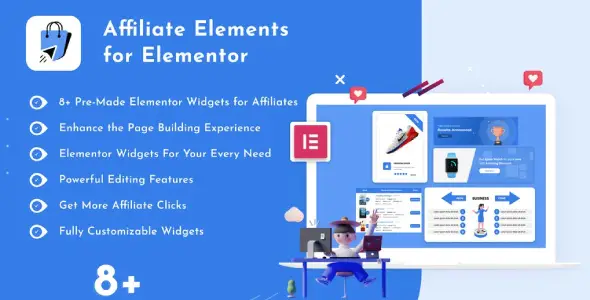
Affiliate Elements for Elementor
⚡ Instant Direct Download link delivered immediately to your account
Bank-Grade Encrypted Gateway • Instant Digital Download • Zero Risk Guarantee
100% Working Genuine GPL Untouched Files & Safe Direct Downloads
Product Overview
Affiliate Elements For Elementor GPL Overview
Affiliate Elements For Elementor is a WordPress addon by Techeshta that provides purpose-built Elementor widgets for affiliate pages. It helps editors design product listings, highlighted recommendations, comparison tables, pros-and-cons sections, and calls to action through Elementor's visual interface. Instead of constructing every affiliate component from generic columns, icons, headings, images, and buttons, a publisher can begin with a specialised widget and customise it to match the site.
The plugin is most useful for product-review blogs, software recommendation sites, deal pages, buying guides, service comparisons, and other content where several offers must be presented consistently. Its widgets are design components; they do not automatically create an affiliate account, retrieve product data from every merchant, verify a price, write a trustworthy review, or guarantee clicks and commissions. Publishers must supply accurate content, approved affiliate links, transparent disclosures, and meaningful editorial guidance.
The GPLCARE product title and short description do not state a version. The linked Envato listing originally advertised 8+ elements, while the developer's current page describes 10+ widgets and identifies a current product version. The contents of a particular downloadable archive can differ from the latest developer page. Inspect the included version and documentation, then test it against the current WordPress, PHP, Elementor, theme, and browser environment before production use.
What The Plugin Adds To Elementor
Affiliate content has recurring design patterns. A review needs a concise verdict, balanced strengths and limitations, a clear product identity, and a responsible destination link. A comparison needs consistent criteria across several options. A promotional section needs enough visual emphasis to be noticed without overwhelming the article. Affiliate Elements For Elementor packages these patterns as draggable widgets.
The developer's documentation specifically covers AE Call To Action, AE Pros And Cons, AE Comparison Table, AE Featured Product, and AE Product Listing. Other elements may exist in newer or different releases, but those five form the verified core workflow. Each widget can be placed inside an Elementor section or container and adjusted through the controls available in the installed package.
Typography, images, icons, colours, spacing, and related presentation settings are central to the developer's feature description. Ready-made designs help editors start quickly, while responsive output and live preview support adaptation across devices. The result should still follow a consistent design system; a collection of individually attractive widgets can feel fragmented when every colour, button, border, and spacing rule is different.
Verified Affiliate Widgets
AE Call To Action
The Call To Action widget combines visual and written elements into a focused promotional box. It can be used after a product explanation, inside a buying guide, or near a conclusion where the reader has enough context to make the next decision. A useful call to action names the destination clearly and avoids pressure tactics or unsupported urgency.
Choose button language that explains what happens next, such as checking current pricing, viewing the official product page, or comparing available plans. Do not disguise an affiliate link as a neutral navigation control. Place a disclosure where the relationship is easy to understand, and test the complete tracking link in a logged-out browser.
AE Pros And Cons
The Pros And Cons widget presents positive and negative considerations in a scan-friendly format. It can make a detailed review easier to evaluate, especially for readers comparing several choices. The developer highlights the ability to include a relevant image and use different designs for the section.
Balanced content matters more than visual symmetry. Do not invent a minor disadvantage simply to make both columns equal, and do not omit serious limitations to protect conversion. Write specific points based on research or genuine testing. “Good quality” provides little value; “supports offline export but lacks team permissions” tells the reader something actionable.
AE Comparison Table
The Comparison Table widget is designed for side-by-side evaluation. It can organise products, plans, services, or software around consistent criteria and help readers locate meaningful differences quickly. Comparison works best when every column uses the same definitions and measurement basis.
Keep the table focused. Too many rows can become difficult to scan, while too many products can make mobile presentation unwieldy. Start with the factors that change a purchase decision: price basis, essential features, audience fit, limits, warranty, compatibility, or support. Verify dated information and state when it was checked.
AE Featured Product
The Featured Product widget gives one recommendation greater visual importance. It may be suitable for an editor's pick, best-value option, sponsor spotlight, or primary product within a review. The reason for the distinction should appear in the surrounding content rather than being conveyed only by a badge or colour.
A featured treatment should not imply independent superiority when placement was paid or determined by commission. Explain the selection criteria and disclose sponsorship appropriately. If price or availability can change, direct visitors to confirm the current offer on the merchant website.
AE Product Listing
The Product Listing widget helps present several products or offers in a repeatable format. Consistency improves comparison because the reader sees comparable details in the same order. Product listings can support category roundups, alternatives, accessories, recommended tools, or a short deal collection.
Curate the list rather than filling a page simply because the widget accepts more entries. Each item should serve a distinct need, budget, or audience. Remove discontinued offers, verify destination links, and prevent multiple buttons from competing for attention inside one compact card.
How To Build An Affiliate Page With Elementor
- Define The Search Intent: Decide whether the page answers a review, comparison, alternatives, “best for” shortlist, or deal-discovery question.
- Research The Products: Confirm specifications, pricing basis, limitations, availability, and affiliate programme terms using reliable sources.
- Outline The Decision: Establish the criteria readers need before selecting widgets or styling the layout.
- Install The Required Plugins: Ensure Elementor is installed and working, then activate the correct Affiliate Elements archive on staging.
- Choose The Right Widget: Use a comparison table for consistent differences, pros and cons for tradeoffs, and a featured product only when the emphasis is justified.
- Add Original Content: Write helpful analysis around the widgets so the page is more than a collection of promotional boxes.
- Apply The Design System: Match site typography, spacing, colour, border, icon, and button rules across every element.
- Add And Verify Links: Insert approved affiliate destinations, confirm tracking, and check that links reach the intended product or offer.
- Test Every Device: Review tables, buttons, text wrapping, images, and spacing at desktop, tablet, and mobile widths.
- Publish With Disclosure: Include a clear affiliate notice and continue monitoring prices, availability, product facts, and broken links.
Designing A Useful Comparison Table
A comparison table should shorten a decision, not display every fact available. Begin by listing the questions real readers ask. For hosting plans, those might include renewal price, storage, backup policy, support channel, and migration. For software, they may include platform support, licence type, collaboration, export formats, and major limits. For physical products, dimensions, capacity, compatibility, warranty, and use environment may matter.
Use the same units and terminology across columns. If one product shows a monthly cost and another shows an annual total, label the basis clearly. If a feature is conditional or available only on a higher plan, do not reduce it to a misleading checkmark. Short notes can be more honest than a binary symbol.
Mobile tables are challenging. Long columns may require horizontal scrolling, stacked cards, or a smaller set of primary criteria. Test the actual widget behaviour rather than assuming “responsive” means every large comparison is easy to use. Keep important labels visible and avoid text so small that readers must zoom.
Writing Honest Pros And Cons
Pros and cons are strongest when they reveal the conditions behind a recommendation. A tool can be easy for beginners but limited for developers. A product can be inexpensive initially but costly after accessories. A service can offer excellent features while requiring an annual commitment. Those tradeoffs help readers choose according to their own priorities.
Avoid repeating the sales page. Use evidence from documentation, specifications, demonstrations, tests, policies, and reliable user feedback. Separate facts from opinions. If you have not used a product personally, do not imply hands-on experience. Correct errors promptly and date information that is likely to change.
The visual design should keep positive and negative points equally readable. Do not use tiny low-contrast text for disadvantages or hide them behind an interaction. Relevant icons and colours can aid scanning, but text must carry the meaning for people who cannot perceive the colour difference.
Featured Products And Calls To Action
A featured product deserves a stated reason. It might offer the best balance for a defined audience, a lower total cost, stronger compatibility, or a specific capability competitors lack. Place that reason near the widget and connect it to the comparison criteria used elsewhere on the page.
Calls to action should arrive after sufficient context. Repeating a large button after every paragraph can interrupt reading and reduce trust. Use a clear hierarchy: one primary action for the recommended path and restrained secondary actions for alternatives. Button text should identify the destination instead of making an unprovable promise.
Affiliate Elements For Elementor formats the presentation, while data or link-management workflows can remain separate. For product retrieval from shop pages without a formal API, Affiliate Egg Pro v10.9.22 addresses a different part of affiliate publishing. Verify compatibility and requirements before combining any two plugins.
Customization And Brand Consistency
The developer lists controls for typography, images, icons, colours, and related settings. Use them to extend the existing site identity rather than inventing a separate style for affiliate sections. Match heading scale, paragraph size, button radius, border tone, and spacing rhythm with the rest of the page.
Create reusable rules before building dozens of posts. Decide how a featured recommendation looks, which colours indicate pros and cons, how comparison headers are styled, and what wording buttons use. Consistency makes pages easier for readers to understand and easier for editors to maintain.
Live preview helps during creation, but it is not a replacement for public-page checks. Theme styles, caching, minification, consent tools, fonts, and responsive breakpoints can affect the rendered result. Test while logged out and compare several representative posts.
Responsive And Accessibility Guidance
The product is described as responsive across phones, tablets, laptops, and desktops. Editors must still supply content that fits those layouts. Long product names, detailed feature rows, large images, and several action buttons can exceed the space a widget design anticipated.
Check keyboard operation, focus visibility, heading order, link names, image alternative text, and colour contrast. Icons should not be the only way a pro or con is communicated. If a comparison uses green and red, include words or meaningful symbols that remain clear without colour perception.
Affiliate links need descriptive text. Screen-reader users should understand whether a link opens a product, current price, merchant page, or comparison. Avoid opening every destination in a new tab without warning, and make touch targets large enough for mobile users.
Affiliate Disclosure And Compliance
Publishers should disclose affiliate relationships clearly and near the promotional content. The exact legal standard depends on location and audience, while individual networks and merchants have their own rules. A general disclosure in the footer may not be enough if readers encounter a featured product or comparison before understanding the commercial relationship.
Do not add false countdowns, invented scarcity, misleading discounts, or unsupported “best” claims to increase clicks. If the merchant provides a price, rating, review count, or availability status, verify it and identify when it was checked. Let the merchant confirm final transaction details.
Images, logos, specifications, and brand names may be subject to merchant programme rules and intellectual-property rights. Use authorised assets and follow trademark guidance. The plugin's ability to place an image does not grant permission to use any image found online.
SEO Recommendations For Affiliate Pages
Search value comes from useful judgement, not the presence of a comparison table. Write an original introduction, explain methodology, define the audience, compare meaningful attributes, discuss limitations, and answer follow-up questions. A widget can improve readability but cannot transform thin copied data into expert content.
Keep each page focused on a distinct intent. Avoid generating many near-identical “best product” pages that differ only by a keyword. Update time-sensitive pages, remove expired offers, and merge overlapping content. Use internal links to guide readers into related research rather than repeating exact-match anchors mechanically.
Optimise images and monitor Elementor's front-end assets. A page with several widgets, large images, tracking scripts, ad systems, and comparison data can become slow. Test Core Web Vitals and remove elements that do not help the decision. Browse the WordPress Plugins Collection for other downloadable tools, but activate only what the site genuinely needs.
Version And Compatibility Considerations
No version is stated in this product title. The linked Envato entry contains older compatibility language, while the developer's current page describes product version 1.6.3 and newer platform information. Those public pages can change and do not prove which release is inside this GPLCARE archive. Check the plugin header, changelog, and included files after download.
Use a staging copy to test WordPress, PHP, Elementor Free or Pro, theme templates, multilingual plugins, caching, security rules, and browser behaviour. The developer describes WPML compatibility and Elementor-compatible theme support, but exact combinations still require testing. Review every widget you plan to use, not only one sample.
If Elementor becomes stuck while loading, temporarily disable optimisation on staging, clear generated CSS and caches, review browser-console errors, and compare with a simple compatible theme. Re-enable other plugins individually to locate a conflict. Do not make broad production changes without a backup and rollback plan.
Installation And Setup
Back up the site and inspect the downloaded archive. Upload the actual plugin ZIP rather than a wrapper containing documentation. In WordPress, go to Plugins, choose Add New, select Upload Plugin, install the archive, and activate it. Ensure Elementor is already installed and operating normally.
Create a private test page and open it with Elementor. Search the widget panel for the Affiliate Elements group or the documented AE widget names. Add one component, enter test content, style it, and preview the public page. Confirm that buttons, images, text, and responsive behaviour are correct before building a complete comparison.
Once the first widget is stable, define reusable style rules and build the remaining components. Keep links in a controlled record so tracking parameters can be audited. After publishing, monitor broken links, product changes, mobile layout, and disclosure placement.
GPL Download And Support Expectations
A GPL-distributed download provides software files under the applicable licence. It does not automatically include the original Envato subscription, Techeshta customer account, personalised support, licence key, or vendor-controlled automatic updates. If the project relies on those services, purchase the appropriate access directly from the developer or marketplace.
The plugin does not include merchant affiliate approval. Join relevant programmes separately, use authorised links and assets, and follow commission, pricing, disclosure, and brand rules. Keep the installed addon updated from a trusted maintained source and remove it if the project no longer uses its widgets.
Frequently Asked Questions
Does This Plugin Replace Elementor?
No. It is an Elementor addon, so Elementor must be installed and active. Confirm the dependency requirements of the exact archive.
Which Widgets Are Confirmed?
The developer documentation explicitly covers AE Call To Action, AE Pros And Cons, AE Comparison Table, AE Featured Product, and AE Product Listing. Newer releases may contain additional elements.
Can It Create Comparison Tables?
Yes. AE Comparison Table is a documented widget. Editors must provide accurate, consistently measured comparison content and test the mobile result.
Can It Display Pros And Cons?
Yes. AE Pros And Cons provides different designs for strengths and limitations. Write balanced, evidence-based points instead of copying promotional claims.
Does It Import Product Data Automatically?
Automatic merchant-data import is not identified as the core function of this design addon. It supplies Elementor widgets. Use a separate approved data workflow when automatic retrieval is required.
Is The Plugin Responsive?
The developer describes responsive support. Real usability still depends on content length, the chosen widget, theme styles, breakpoints, and device testing.
Is Coding Required?
Routine widget creation and styling are designed for Elementor's visual interface. Custom behaviour beyond the available controls may require CSS or development work.
Why Choose Affiliate Elements For Elementor?
Affiliate Elements For Elementor is a practical choice when an Elementor website needs repeatable affiliate-content patterns without reconstructing every section from basic widgets. Its documented tools cover calls to action, pros and cons, comparison tables, featured products, and product listings, supported by visual customisation and responsive design.
The plugin is only the presentation layer. Results depend on honest research, clear selection criteria, accurate links, transparent disclosure, consistent styling, accessibility, and ongoing updates. Inspect the package version, test the exact environment, and use each widget where it genuinely helps a reader make a better decision.
Technical Specifications & Compatibility
| License | GPL |
| Current Version | v10.9.4 |
| Original Author | GPLCare |
| WordPress Compatibility | WP 5.8 to 6.7+ (Fully Compatible) |
| PHP Requirements | PHP 7.4 / 8.0 / 8.1 / 8.2 / 8.3 |
| File Integrity | 100% Untouched (Original .zip) |
| Security & Safety | 100% Clean & Verified (Safe) |
| Download Delivery | Instant Direct High-Speed Download |
Instant Direct Download
High-speed direct download link
100% Virus-Free
Verified authentic & clean files
VIP Priority Support
Direct 24/7 Helpdesk & Ticket
Related Products You May Like
View Catalog → 🔥 HOT DEAL
 🔥 HOT DEAL
WooCommerce - Payson Gateway WooCommerce Extension 1.7.4
 🔥 HOT DEAL
 🔥 HOT DEAL
Customer Reviews
No reviews yet for this product
Have you purchased or downloaded this item? Be the first to share your honest feedback with the community!
Want Unlimited Access to This & 7,400+ Other Items?
Stop buying items one by one. Join thousands of creators getting 1-click instant direct downloads, daily regular updates, and priority support for our entire theme and plugin collection.