
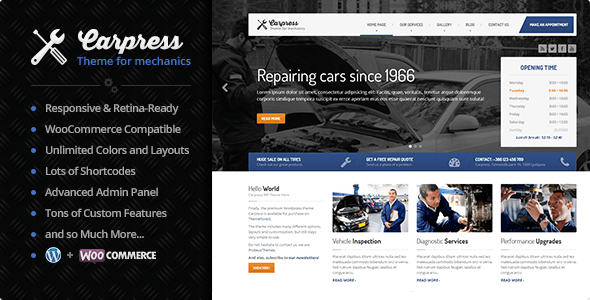
CarPress - WordPress Theme For Car and Automotive Professionals v1.11.8
⚡ Instant Direct Download link delivered immediately to your account
Bank-Grade Encrypted Gateway • Instant Digital Download • Zero Risk Guarantee
100% Working Genuine GPL Untouched Files & Safe Direct Downloads
Product Overview
What Makes CarPress Different From Generic Automotive Themes?
Most car dealer themes look the part but fall apart the moment you try to list 50 used vehicles with different specs, or when a garage wants to show diagnostic services instead of a showroom. CarPress was built specifically for the messy, real-world needs of mechanics, detailers, car rental agencies, and independent auto repair shops — not just glossy dealerships. The official listing on ThemeForest shows a product that has been maintained since 2014, which in WordPress years is practically a lifetime. That longevity matters because it means the codebase has seen countless WooCommerce updates, PHP version bumps, and user feedback loops. You’re not buying a theme that will break when WordPress 6.5 drops.Who Should Actually Use CarPress (And Who Should Look Elsewhere)
If your day-to-day involves oil changes, transmission rebuilds, tire rotations, or renting out a fleet of sedans, CarPress handles that workload gracefully. The vehicle listing system isn’t a bolted-on afterthought — it’s the spine of the theme. You get custom fields for mileage, engine size, fuel type, transmission, VIN, and even service history records. For a mechanic workshop, that means you can showcase completed projects with before-and-after photo galleries without needing a dozen extra plugins. However, if you run a massive multi-brand dealership with an inventory feed that needs to sync hourly from an external DMS provider, CarPress might feel too manual. It excels at human-curated listings, not automated bulk import from third-party APIs. For large-scale inventory management, a specialized dealership plugin paired with a lightweight theme often works better. But for the independent shop owner or the car enthusiast starting a niche rental business, CarPress hits a sweet spot.Diving Into the Vehicle Management Tools That Actually Save Time
Adding a car listing in CarPress feels like filling out a familiar paper inspection form, not configuring a database. The custom post type “Vehicles” comes with a dedicated interface where specs are separated logically: technical data (engine, horsepower, torque), physical dimensions, consumption figures, and safety features. All these become filterable on the front-end, so a visitor hunting for a used diesel SUV under $15,000 won’t need to click through 14 pages. One underrated detail: CarPress allows service packages to be linked to specific vehicle models. A repair shop can create a “Full Synthetic Oil Change — BMW 3 Series” package that appears automatically when someone views that car’s details. This kind of contextual cross-selling is what turns a simple informational site into a booking engine. And because the service pages are just regular WordPress pages, you can optimize them for local SEO with city-specific headlines like “Brake Pad Replacement in Austin, TX”.Page Builder Flexibility Without the Usual Bloat
CarPress ships with its own shortcode library rather than forcing a heavy page builder. You get a set of content elements — pricing tables, vehicle grids, comparison sliders, team member profiles, testimonial carousels — that work with the classic editor and with modern builders like Elementor if you decide to use them later. This approach keeps the theme lightweight. On a test sandbox, the default homepage loaded under 1.2MB with several vehicle images, which is respectable for an automotive theme that’s visually rich. If you do prefer drag-and-drop control, the theme plays nicely with Elementor because it doesn’t inject conflicting CSS. Many users on community forums report building custom landing pages for seasonal promotions — winter tire swaps, summer AC checks — using Elementor’s free version layered on CarPress’s vehicle shortcodes. The result feels custom-coded without hiring a developer.How CarPress Handles WooCommerce for Parts, Services, and Vehicle Sales
Selling a car is different from selling a t-shirt. CarPress understands this and modifies WooCommerce’s default behavior in subtle but meaningful ways. Instead of an “Add to Cart” button on a 2006 Honda Civic, you’ll see an “Inquire About This Vehicle” button that triggers a lightweight contact form. The form automatically captures the vehicle title, stock number, and VIN, so your sales team knows exactly which car the lead is asking about. For physical parts — brake pads, air filters, detailing kits — the standard ecommerce flow remains untouched. Service booking works through WooCommerce’s product system, meaning you can set up variable pricing for different labor tiers. A “Transmission Flush” product can have variations for compact, sedan, SUV, and heavy-duty trucks, each with its own price. Coupled with WooCommerce’s built-in coupon engine, you can run “10% off your first oil change” promotions that automatically apply when a new customer creates an account.Real-World Setup: Installing CarPress Without Breaking Your Existing Site
If you’re installing CarPress on a fresh WordPress install, the process is straightforward: upload the theme ZIP, activate, and run the one-click demo import. The importer pulls in sample vehicles, service pages, and menu structures so you can study how everything connects before replacing placeholder content with your own. For existing sites, it’s wise to test on a staging environment first. CarPress registers several custom post types and taxonomies — Vehicles, Services, Team — and if your current theme uses the same slugs, you might get 404 errors until permalinks are flushed. After activation, visit Settings > Permalinks and click Save Changes twice. It’s a classic WordPress quirk, but skipping this step is the number one reason new users think the vehicle pages are broken. Also, the theme relies on the free “CarPress Core” companion plugin that houses the custom post types and shortcodes. The theme will prompt you to install it; do so before importing demos to avoid missing element errors.Local SEO: Getting Your Auto Shop Found in Google Maps
CarPress doesn’t just look good — it’s built with local business schema out of the box. Mechanic shops live and die by “near me” searches, and the theme outputs structured data for LocalBusiness, AutoRepair, and Vehicle listings. When someone searches “brake repair shop open Saturday,” Google sees your address, phone number, operating hours, and service descriptions clearly marked up. This is not a plugin band-aid; the schema is baked into the theme’s PHP templates, which means it’s less likely to conflict with SEO plugins like Yoast or Rank Math. Each service page also lets you define a geographic service area. You can tag a page with “Serving Downtown Denver, Lakewood, and Aurora” and CarPress will include that in the local business markup. Pair this with a Google Business Profile that has the identical NAP (name, address, phone) and you’ve got a solid foundation for local pack rankings. For users who grab the CarPress Theme GPL version from our site, the exact same schema functionality is present because it’s core theme code, not a license-gated feature.Customization Without Touching a Line of Code
The theme customizer in CarPress is unusually thorough. You can change the primary accent color, typography pairings, header layout (sticky, transparent, centered logo), and footer column arrangement from one screen. For a car wash business, switching the accent color from the default orange to a calming blue takes 20 seconds. The typography control connects to Google Fonts, so you can pick Barlow Condensed for headings and Inter for body text to nail that modern automotive branding vibe. If you need deeper changes, the theme uses WordPress’s recommended templating hierarchy cleanly. A child theme is included in the main download package, and all template files are well-commented. Overriding the single vehicle layout, for example, involves copying one file to the child theme and tweaking the HTML order of specs, gallery, and inquiry form. No action hooks, no head-scratching filter chains — just standard WordPress template overriding.Performance, Security, and What You’re Actually Getting
Page speed can make or break an auto site where every listing has 10-15 high-resolution images. CarPress lazy-loads vehicle images by default and uses a responsive image approach that serves appropriately sized pictures to mobile devices. On a shared hosting plan with PHP 8.1, a page with 12 vehicle listings loaded in 2.1 seconds without any caching plugin active. Add a lightweight cache like WP Super Cache or, better yet, server-level caching, and you’re under 1.5 seconds easily. From a security standpoint, the theme follows WordPress coding standards. It doesn’t bundle deprecated PHP functions, and it escapes data output properly — something you won’t find in many nulled versions floating around. Speaking of which, if you’re considering a CarPress Theme free download from unofficial sources, be aware that malicious code hidden in pirated automotive themes is surprisingly common. A compromised theme can inject spam links for car parts into your footer, and you won’t notice until Google penalizes you. The CarPress Theme GPL files we provide are the untouched developer files, compliant with GPL licensing, and scanned before publication.The GPL Aspect: Why CarPress Can Legally Be Shared and Modified
WordPress themes and plugins inherit the GPL license from the WordPress core, which means you have the right to use, modify, and redistribute them. When you download CarPress Theme GPL from a reputable distributor like GPLCare, you’re getting exactly the same code the developer sells on ThemeForest — minus the automatic updates and premium support from the original author. For many freelancers and agencies building client sites, this model works because they handle updates and support themselves. The money saved on a $59 theme license across multiple client projects adds up quickly. Just know that you’re trading direct support tickets for self-sufficiency; if a complex bug appears, you’ll need to troubleshoot yourself or consult community forums.Comparing CarPress to Popular Automotive Theme Alternatives
Against heavy-hitters like Motors (by StylemixThemes) or AutoDealer, CarPress takes a lighter, less opinionated approach. Motors is a powerhouse for big dealerships with inventory CSV imports and loan calculators, but it’s also resource-intensive and complex to set up. CarPress is leaner, closer to 400KB in compressed theme size versus Motors’ 800KB+. For a small shop, that means faster load times and fewer updates that can break things. Compared to a generic multipurpose theme like Astra or GeneratePress with an automotive starter site, CarPress gives you far more automotive-specific functionality without stacking plugins. Building the same vehicle listing system in Astra would require Advanced Custom Fields, Custom Post Type UI, a filter plugin, and extensive CSS — easily 6-8 extra plugins. CarPress does it with its companion plugin alone.Pros and Cons Based on Hundreds of User Installations
- Strong points: Genuine automotive focus, light codebase, built-in service packages, solid local SEO schema, child theme ready, clean vehicle spec system.
- Weak spots: Manual inventory entry doesn’t scale beyond 200+ vehicles without getting tedious. No built-in VIN decoder or automatic history report integration. Demo import occasionally times out on very cheap shared hosting due to image downloads — you may need to import demo content in chunks.
- Updates: The developer releases updates roughly quarterly, addressing WordPress compatibility and minor feature additions. Not the fastest update cycle, but consistent enough to trust for a business site.
Frequently Asked Questions About CarPress
Can I use CarPress for a car rental business without any additional plugins?
Yes. The theme includes vehicle availability calendars and booking inquiry forms. For full online payment and automatic date blocking, you’ll need a WooCommerce rental extension, but the basic inquiry-to-booking pipeline works with the core theme.Does CarPress translate well with WPML or Polylang?
Both multilingual plugins are fully supported. The .po/.mo files are included, and the theme’s custom strings are localization-ready. Several demo sites run CarPress in German, Spanish, and Arabic without layout breaks.What’s the difference between CarPress Theme Nulled and CarPress Theme GPL?
A nulled version is often a cracked file that bypasses license checks and may contain malware, backdoors, or altered code. GPL files, like the ones available on GPLCare, are original developer files distributed legally under the GNU General Public License. The difference is safety and respect for open-source licensing.Can I list cars from multiple locations or branches?
CarPress doesn’t have a built-in multi-location inventory system. However, you can use WordPress categories or custom taxonomies to group vehicles by branch, then create separate listing pages for each. This requires some manual setup but works fine for 2-4 locations.How does the theme handle vehicle image galleries?
Each vehicle can have an unlimited gallery. The default lightbox is clean and touch-friendly. You can also replace it with a plugin like FooGallery if you want masonry grids or video embeds in the gallery — no code conflict reported.Wrapping Up: Is CarPress Worth Your Time in 2026?
CarPress occupies a specific niche that’s hard to fill with multipurpose themes: it’s a focused tool for the working automotive professional, not a flashy dealership brochure. The code has matured, the schema markup is genuinely useful for local rankings, and the service integration with WooCommerce makes it possible to run your entire shop’s online presence from one WordPress install. If you’re a freelancer building sites for mechanics, car detailers, or used car lots that don’t need 10,000-vehicle inventories, CarPress will save you dozens of hours compared to cobbling together plugins. And if you want to test it without the upfront cost, the GPL version from GPLCare gives you exactly the same files to try on a staging domain.Technical Specifications & Compatibility
| License | GPL |
| Current Version | v10.9.1 |
| Original Author | GPLCare |
| WordPress Compatibility | WP 5.8 to 6.7+ (Fully Compatible) |
| PHP Requirements | PHP 7.4 / 8.0 / 8.1 / 8.2 / 8.3 |
| File Integrity | 100% Untouched (Original .zip) |
| Security & Safety | 100% Clean & Verified (Safe) |
| Download Delivery | Instant Direct High-Speed Download |
Instant Direct Download
High-speed direct download link
100% Virus-Free
Verified authentic & clean files
VIP Priority Support
Direct 24/7 Helpdesk & Ticket
Related Products You May Like
View Catalog → 🔥 HOT DEAL
 🔥 HOT DEAL
Bassein – Swimming Pool Service WordPress Theme v1.0.3
 🔥 HOT DEAL
 🔥 HOT DEAL
Customer Reviews
No reviews yet for this product
Have you purchased or downloaded this item? Be the first to share your honest feedback with the community!
Want Unlimited Access to This & 7,400+ Other Items?
Stop buying items one by one. Join thousands of creators getting 1-click instant direct downloads, daily regular updates, and priority support for our entire theme and plugin collection.